
Lua scripting in send2cnc
Lua is a lightweight, efficient and easy-to-learn scripting language and is one of the most popular scripting languages for embedding in applications. It provides users with an interface to communicate with the application and flexibly expand its functionality.
In send2cnc, Lua is used in various areas, such as tool geometry scripts and, in particular, postprocessors.
Although Lua is an easy-to-learn scripting language, a general introductory course is beyond the scope of this manual. Fortunately, there are many easily accessible online resources that provide an excellent introduction to the Lua scripting language.
This chapter focuses on teaching you the syntax and possibilities of the send2cnc API so that you can exploit the full potential of your scripts.
Functions and methods - group system
Global variables
| Syntax | Short description |
|---|---|
| scriptDir | Returns the directory of the current Lua script. |
| scriptFile | Returns the file of the current Lua script. |
Functions
| Syntax | Short description |
|---|---|
| nil s2.clear() | Deletes the text output to the console. |
| nil s2.print(args,...) | Outputs a variable number of arguments of any type to the console. |
| nil s2.printnl(args,...) | Prints a variable number of arguments of arbitrary types to the console, adding a newline at the end. |
| nil s2.printDelim(string delimiter, args,...) | Prints a variable number of arguments of arbitrary types to the console. The passed delimiter is used as a separator. |
| nil s2.nl() | Creates a line break in the console. |
| nil s2.abort(args,...) | Aborts the execution with the given error message and signals a script error to send2cnc |
| nil s2.success(args,...) | Outputs a message in the console that is visually distinct from other messages. |
| nil s2.warn(args,...) | Generates a warning message that the user must confirm with OK. |
| nil s2.error(args,...) | Generates an error message that the user must confirm with OK. |
| bool s2.okay(args,...) | Generates a message that the user must confirm with OK. Always returns true. |
| bool s2.yn(args,...) | Generates a message that the user must confirm with Yes or No. Returns true (Yes) or false (No). |
| returnval s2.ync(args,...) | Generates a message that the user must confirm with Yes, No or Cancel. Returns true (Yes), false (No) or nil (Cancel). |
| nil s2.sleep(time) | Waits for the given amount of time before continuing the script. A positive value is interpreted as milliseconds, a negative value as seconds. |
| string s2.timestamp(string format) | Returns the current date and time in the given format. Default format: %Y-%m-%d %H:%M:%S (e.g. "2025-01-01 12:34:56"). |
| string s2.username() | Returns the name of the logged-in user. |
| string s2.arg(int argindex) | Returns an argument passed when send2cnc is started, according to the argument position passed (starting at 0). |
| string s2.type(arg) | Returns the type or class name of the passed argument. |
| clstxtbuf s2.txtBuf() | Creates a new text buffer object. |
| clstxtbuf s2.workdirSet() | Sets the current working directory. |
Methods
| Syntax | Short description |
|---|---|
| nil clstxtbuf:add(args,...) | Converts the passed arguments into strings and adds them to the text buffer object. |
| nil clstxtbuf:addnl(args,...) | Converts the passed arguments into strings and adds them to the text buffer object with a final line break. |
| nil clstxtbuf:print() | Outputs the text buffer object in the console. |
| nil clstxtbuf:save(args,...) | Assembles the passed path sections into a file name and stores the text buffer object in the file. |
Functions and Methods - Path Group
Functions
| Syntax | Short description |
|---|---|
| string s2.path.build(fpath,...) | Assembles the given path segments and returns the resulting absolute path. If no absolute path is given, the path is calculated relative to the set working directory. |
| string s2.path.basename(fpath,...) | Assembles the given path segments and returns the name of the last segment without the file extension. |
| string s2.path.extension(fpath,...) | Assembles the given path segments and returns the file extension of the last part of the path. |
| string s2.path.directory(fpath,...) | Assembles the given path segments and truncates the last part of the path. |
| string s2.path.homedir() | Returns the current user directory. |
| string s2.path.testDirectory(fpath,...) | Assembles the given path sections and returns the absolute path to the directory if successful, or nil if the directory does not exist. |
| string s2.path.testFile(fpath,...) | Assembles the given path sections and returns the absolute path to the file if successful, or nil if the file does not exist. |
| string s2.path.testProject(fpath,...) | puts the given path segments together and checks if it is a send2cnc project file. Returns nil or the absolute path if successful. |
| string s2.path.testTemplate(fpath,...) | puts the given path segments together and checks whether it is a send2cnc template file. Returns nil or the absolute path if successful. |
| string s2.path.testS2c(fpath,...) | Assembles the passed path sections and checks whether it is a send2cnc project or template file. Returns nil or, if successful, the absolute path. |
| string s2.path.testImport(fpath,...) | puts the passed path sections together and checks whether it is a file format supported for import. Returns nil or, if successful, the absolute path. |
| string s2.path.testImage(fpath,...) | Assembles the given path segments and checks whether the image is supported for import. Returns nil or, if successful, the absolute path. |
| string s2.path.testStl(fpath,...) | Assembles the given path segments and checks whether the file is a 3D format that can be imported. Returns nil or, if successful, the absolute path. |
| string s2.path.testAny(fpath,...) | Assembles the given path segments and checks whether the file is suitable for opening or importing. Returns nil or the absolute path if successful. |
| string s2.path.testExists(fpath,...) | puts the passed path sections together and checks whether the directory or file exists. Returns nil or the absolute path if successful. |
Functions and Methods - Group File
This API group provides access to the file system.
Functions
| Syntax | Short Description |
|---|---|
| string s2.file.load(string fpath,...) | Reads the target file and returns the content as a string. |
| bool s2.file.save(string content, string fpath,...) | Saves the transferred string to the target file. |
| bool s2.file.apend(string content, string fpath,...) | Appends the transferred string to the target file. |
Functions and Methods - Group Config
This API group provides access to the system settings.
Functions
| Syntax | Short Description |
|---|---|
| string s2.cfg.get(string cfgname) | Returns the assigned value for the passed system setting key. |
| bool s2.cfg.getBool(string cfgname) | Returns the assigned value for the given system settings key as a Boolean. |
| int s2.cfg.getInt(string cfgname) | Returns the assigned value for the given system settings key as an integer. |
| float s2.cfg.getFloat(string cfgname) | Returns the assigned value for the passed system setting key as a floating point number. |
Functions and Methods - Group Object
This API group enables the processing of objects. Objects are all elements of a project. These can be, for example, the project itself, models, tools or job objects.
Functions
| Syntax | Short description |
|---|---|
| clsobj s2.obj.getProject(integer id) | Returns the open project with the consecutive id, starting with 1. |
| bool s2.obj.open(bool asnew, args, ...) | Assembles the given path and, if successful, opens the project or template file. |
| clsobj s2.obj.newProject() | Creates a new, empty project. |
| float s2.cfg.getFloat(string cfgname) | Returns the assigned value for the transferred system settings key as a floating point number. |
Methods
| Syntax | Short description |
|---|---|
| string clsobj:get("name") | Returns the name of the object. |
| string clsobj:get("nameProject") | Returns the name of the project to which the object belongs. |
| string clsobj:get("dirProject") | Returns the file directory of the project belonging to the object. |
| string clsobj:get("pathProject") | Returns the file directory including the file name of the project belonging to the object. |
| string clsobj:get("unit") | Returns the unit of the project (normally mm or inch). |
| number clsobj:get("vxPerUnit") | Returns the resolution in voxels per unit. |
| number clsobj:get("unitPerVx") | Returns the resolution in units per voxel. |
| clsobj clsobj:getObj(string reference) | Searches for another object based on the object using the transferred reference string. This can be the name of an object (only in the project hierarchy below the initial object) or a special reference. |
| string clsobj:saveProject() | Saves the project belonging to the object and, if successful, returns the absolute file path. |
| string clsobj:saveProjectAs(args,...) | Saves the project belonging to the object under the specified path and returns the absolute file path if successful. |
| clsobj clsobj:dupProject() | Duplicates the project belonging to the object and returns the created project object. |
Functions and Methods - Tool Group
This API group allows you to create tool geometries.
Functions
| Syntax | Short Description |
|---|---|
| clstlgeo s2.tlgeo.new() | Creates a new, empty geometry definition for a tool. |
Methods
| Syntax | Short description |
|---|---|
| nil clstlgeo:depthOfCut(number value) | Returns the maximum depth of cut for which the tool has a cutting edge. |
| nil clstlgeo:slopeIn(number value) | Returns the entry angle for the next element to be created (line or arc) (0° - 90°). |
| nil clstlgeo:slopeOut(number value) | Specifies the exit angle for the next element to be created (only arcs) (0° - 90°). |
| nil clstlgeo:toX(number value) | Specifies the absolute X target position of the next line to be created. Slanted lines are extended until the target position is reached. |
| nil clstlgeo:toZ(number value) | Returns the absolute Z-target position of the next line to be created. Slanted lines will be extended until the target position is reached. |
| nil clstlgeo:length(number value) | Returns the length of the next line to be created. This value can compete with toX or toZ. |
| nil clstlgeo:arcRad(number value) | Returns the radius for the next arc to be created. |
| nil clstlgeo:tangent() | The next element (line or arc) connects tangentially to the last element. This determines the entry radius of the next element. |
| nil clstlgeo:segErrMsg(string msg) | sets an error message for the current segment. If the geometry generation fails at this segment, this error message is displayed. |
| nil clstlgeo:emitLine() | Creates a line with the previously set parameters. |
| nil clstlgeo:emitArcA() | Generates a clockwise arc with the previously set parameters. Regardless of the calculation of the entry and exit angles, it must be ensured that the exit angle is smaller than the entry angle. |
| nil clstlgeo:emitArcB() | Generates an anticlockwise arc with the previously defined parameters. Regardless of the calculation of the entry and exit angles, it must be ensured that the exit angle is greater than the entry angle. |
Functions and Methods - Group Postprocessor
 © send2cnc.com
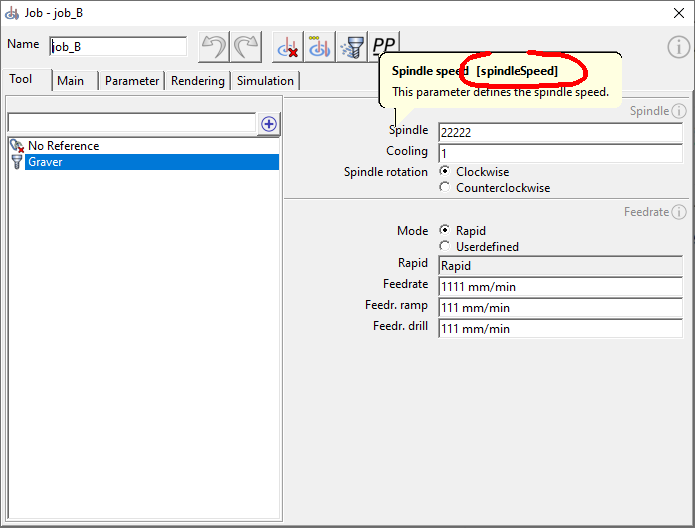
Tooltips
Many of the parameters listed here for the clsppdata:get() object method are displayed in the program interface in the tooltips of the corresponding parameter fields (see figure).
Functions
An overview of the system-called functions that have to be provided by the script creator is described in the chapter "Lua Module Postprocessor"
Methods
The most important methods are highlighted in bold. The links lead to the corresponding parameter descriptions in the manual.
| Syntax | Short description |
|---|---|
| bool clsppdata:get("collision") | Indicates whether a collision has been detected in the job. |
| string clsppdata:get("nameNcOrigin") | Returns the name of the NC origin. |
| string clsppdata:get("nameJob") | Returns the name of the job. |
| string clsppdata:get("nameTool") | Returns the name of the tool. |
| number clsppdata:get("vxPerUnit") | Returns the resolution in voxels per unit. |
| number clsppdata:get("unitPerVx") | Returns the resolution in units per voxel. |
| integer clsppdata:get("cooling") | Returns the cooling mode. |
| integer clsppdata:get("toolId") | Returns the tool NC number. |
| number clsppdata:get("spindleSpeed") | Returns the spindle speed. |
| integer clsppdata:get("spindleRot") | Returns the direction of the spindle. |
| integer clsppdata:get("feedMode") | Returns the feed mode. |
| number clsppdata:get("feed") | Returns the milling feed. |
| number clsppdata:get("feedRamp") | Returns the feed rate for inclined plunging. |
| number clsppdata:get("feedDrill") | Returns the feed rate for vertical plunging. |
| number clsppdata:get("feedRapid") | Returns the feed rate for rapid positioning movements |
| integer clsppdata:get("feedDir") | Returns the feed direction |
| integer clsppdata:get("strategy") | Returns the job strategy used (id) |
| bool clsppdata:get("plungeDrill") | Indicates whether vertical drill plunging is activated. |
| bool clsppdata:get("plungeRamp") | Indicates whether ramp-shaped plunge is activated. |
| bool clsppdata:get("plungeSpiral") | Indicates whether spiral plunging is activated. |
| number clsppdata:get("plungeAngle") | Returns the plunge angle for plungeRamp and plungeSpiral. |
| number clsppdata:get("plungeDia") | Returns the spiral diameter for spiral plunging. |
| integer clsppdata:get("carveMode") | Returns the 3xCarve mode |
| bool clsppdata:get("surfProj") | Indicates whether the surface projection is activated in 3xCarve. |
| number clsppdata:get("surfProjTop") | Returns the positive surface offset. |
| number clsppdata:get("surfProjDepth") | Returns the negative surface offset. |
| number clsppdata:get("planeSite") | Returns the height of the positioning plane. |
| number clsppdata:get("planeTop") | Returns the starting height for processing. |
| number clsppdata:get("planeFloor") | Returns the end height for processing. |
| bool clsppdata:get("areaLimitTop") | Indicates whether the milling path is limited at planeTop. |
| bool clsppdata:get("areaLimitFloor") | Indicates whether the milling path is limited at planeFloor. |
| bool clsppdata:get("areaIn") | Indicates whether areaIn is activated. |
| bool clsppdata:get("areaOut") | Indicates whether areaOut is activated. |
| number clsppdata:get("areaOffsetIn") | Returns the areaOffsetIn value. |
| number clsppdata:get("areaOffsetOut") | Returns the areaOffsetOut value |
| bool clsppdata:get("areaLimitStk") | Indicates whether areaLimitStk is activated. |
| bool clsppdata:get("radiusCorr") | Indicates whether the radius correction is activated. |
| integer clsppdata:get("drillModeTop") | Defines the mode for determining the start points for drilling. |
| integer clsppdata:get("drillModeFloor") | Determines the mode for calculating the drilling depths. |
| number clsppdata:get("drillTop") | [Drilling] Returns the value for the starting height. |
| number clsppdata:get("drillFloor") | [Drilling] Returns the value for the depth. |
| number clsppdata:get("safetyGap") | Returns the safety gap. |
| number clsppdata:get("connect") | Returns the maximum distance for the direct connection of tool paths. |
| number clsppdata:get("stepAe") | Returns the Radial Depth of Cut. |
| number clsppdata:get("stepAp") | Returns Axial Depth of Cut |
| number clsppdata:get("stepApMicro") | Returns Axial Microdepth of Cut |
| number clsppdata:get("allowanceModelXY") | Returns the model allowance in XY direction. |
| number clsppdata:get("allowanceModelZ") | Returns the model allowance in Z direction. |
| number clsppdata:get("allowanceblankXY") | Returns the workpiece allowance in XY. |
| number clsppdata:get("allowanceblankZ") | Returns the workpiece allowance in the Z direction. |
| number clsppdata:get("allowanceFenceXY") | Returns the boundary model allowance in the XY direction. |
| number clsppdata:get("allowanceFenceZ") | Returns the boundary model allowance in the Z direction. |
| bool clsppdata:get("pause") | Indicates whether the job should be paused after execution. |
| integer clsppdata:get("optimize") | Returns the mode for path optimisation. |
| bool clsppdata:get("collisionCheck") | Indicates whether the job was calculated with a collision check |
| integer clsppdata:get("broach") | Returns the broaching strategy |
| integer clsppdata:get("sumModel") | Returns the number of models used for the job. |
| integer clsppdata:get("sumblank") | Returns the number of workpieces used for the job. |
| integer clsppdata:get("sumFence") | Returns the number of boundary models used for the job. |
| integer clsppdata:get("sumSurface") | Returns the number of surface models used for the job. |
| number clsppdata:get("startposX") | Returns the first X-direction toolpath point of the job. |
| number clsppdata:get("startposY") | Returns the first Y-direction toolpath point of the job. |
| number clsppdata:get("startposZ") | Returns the first toolpath point in Z direction of the job. |
| integer clsppdata:get("startposM") | Returns the M value (bit mask) of the first toolpath point of the job. |
| integer clsppdata:get("startposG") | Returns the G value (bit mask) of the first toolpath point of the job. |
| number clsppdata:get("geoMaxX") | Indicates the maximum X value of the NC scene geometry, starting from the workpiece origin. |
| number clsppdata:get("geoMaxY") | Indicates the maximum Y value of the NC scene geometry, starting from the workpiece origin. |
| number clsppdata:get("geoMaxZ") | Indicates the maximum Z value of the NC scene geometry, starting from the workpiece origin. |
| number clsppdata:get("geoMinX") | Indicates the minimum X value of the NC scene geometry, starting from the workpiece origin. |
| number clsppdata:get("geoMinY") | Indicates the minimum Y value of the NC scene geometry, starting from the workpiece origin. |
| number clsppdata:get("geoMinZ") | Indicates the minimum Z value of the NC scene geometry, starting from the workpiece origin. |
| number clsppdata:get("geoSizeX") | Indicates the size of the NC scene in the X direction. |
| number clsppdata:get("geoSizeY") | Indicates the size of the NC scene in the Y direction. |
| number clsppdata:get("geoSizeZ") | Indicates the size of the NC scene in the Z direction. |
| number clsppdata:get("geoOffsetX") | Indicates the minimum Y-value of the NC scene relative to the workpiece origin. |
| number clsppdata:get("geoOffsetY") | Indicates the minimum X-value of the NC scene relative to the workpiece origin. |
| number clsppdata:get("geoOffsetZ") | Indicates the minimum Z value of the NC scene relative to the workpiece origin. |
| number clsppdata:get("lengthG0") | Returns the total length of the positioning movements. |
| number clsppdata:get("lengthG1") | Returns the total length of the milling movements. |
| number clsppdata:get("lengthG1Ramp") | Returns the total length of the ramp-shaped plunging movements. |
| number clsppdata:get("lengthG1Drill") | Returns the total length of the vertical plunge movements. |
| number clsppdata:get("timeG0") | Returns the total time of the positioning movements in minutes. |
| number clsppdata:get("timeG1") | Returns the total time of the milling movements in minutes. |
| number clsppdata:get("timeG1Ramp") | Returns the total time of the ramp-shaped plunge movements in minutes. |
| number clsppdata:get("timeG1Drill") | Returns the total time of the vertical plunge movements in minutes. |